Enforce your CAD naming standard on a whole folder — in one pass.
CADKeeper audits a folder of drawings, flags every name that breaks your standard, and fixes what's safe, without opening AutoCAD or Revit. Every change is previewed and reversible.
- No AutoCAD or Revit needed
- Dry-run preview before anything changes
- One-click rollback of any batch
A folder nobody trusts is a project risk, not a filing quirk.
Inconsistent names quietly cost hours and break drawings. The cheap renamers don't understand CAD standards; the tools that do make you open AutoCAD and click through every file.
- Broken XREFs after a rename. Move a file in Explorer and references silently break. Re-pathing them by hand is the most-cited time sink in CAD forums.
- Version & naming chaos. “Final,” “FinalReal,” cryptic codes, and nobody can tell which file is current or what it holds.
- A standard nobody enforces. You wrote a convention. Checking 4,000 files by hand is impossible, so the standard is just for show.
Point it at a folder. Pick a standard. Approve the fix.
No plugin, no per-seat CAD license, no opening drawings one by one. CADKeeper works on the files themselves: names, paths, and metadata — it never modifies the contents of your drawings.
-
1
Point at a folder
Select any local or network folder. CADKeeper reads names, extensions and structure, and never modifies what's inside your drawings.
-
2
Pick or build a standard
Start from your own rule set: fields, separators, discipline codes, sequence and revision. Named presets are rolling out; custom rules ship today.
-
3
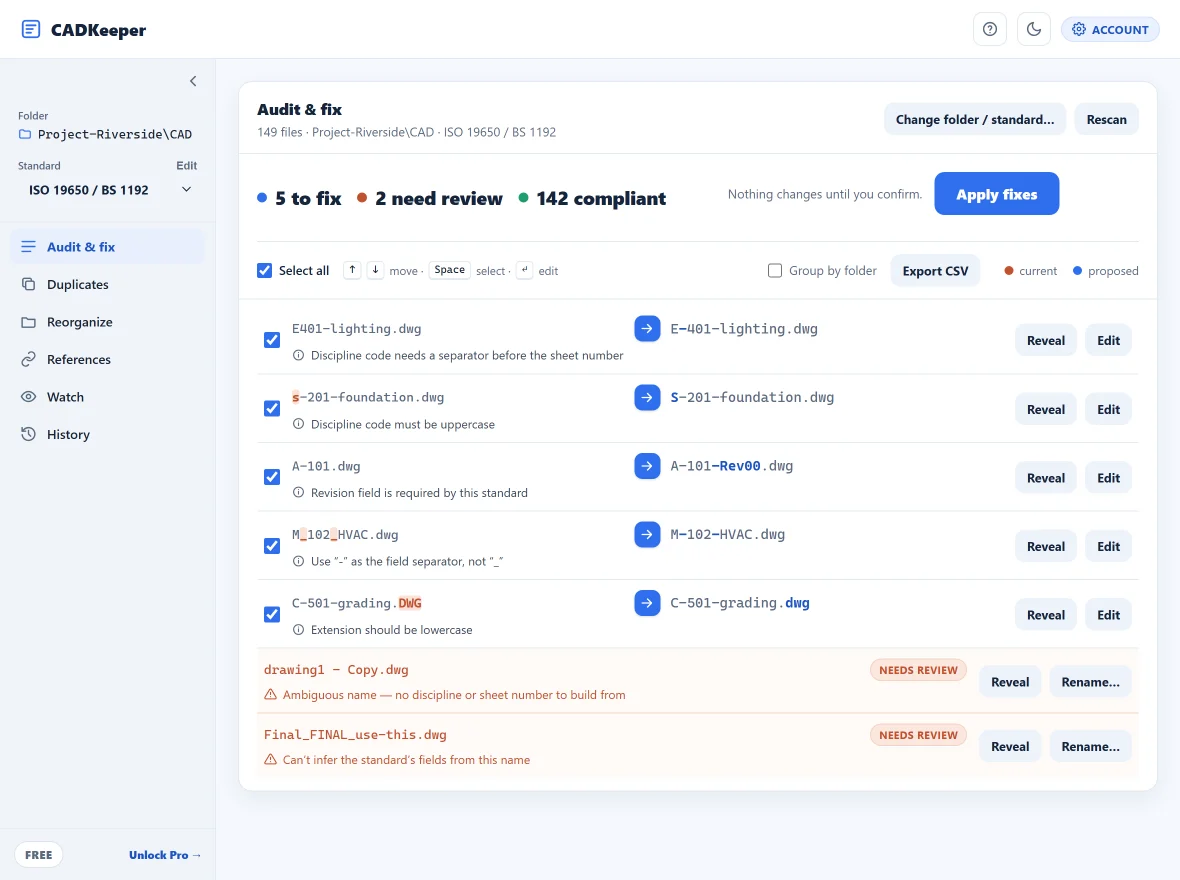
Audit & batch-fix
See every violation, preview the proposed names, auto-fix what's safe in one batch and approve the rest, with a full, reversible change log.
Every change is previewed, logged, and reversible.
The #1 fear with renaming CAD files is breaking references. CADKeeper stages every change, shows you exactly what it will do, and records old name, new name, path, size, timestamp and the standard applied, so you can roll back any batch, even weeks later.
- Mandatory dry-run before anything touches disk
- One-click rollback of any past batch
- Exportable change log for ISO 9001 / 19650 document control
Between a free renamer and a $10k PDM system.
Generic renamers don't know CAD standards. CAD-native tools force you to open the software and only check what's inside the drawing. CADKeeper does the part nobody else does.
| Capability | Generic renamers | CAD plugins / PDM | CADKeeper |
|---|---|---|---|
| Audits file names against a standard | No | Layers only | Yes |
| Batch auto-fix to the standard | Rename only | Flags only | Yes |
| Configurable to your naming rules | Patterns only | Rigid | Yes |
| Runs without CAD software | Yes | No | Yes |
| One-click rollback, no server | Weak | Server-based | Yes |
| Files never leave your machine | Yes | Uploads to server | Yes |
| Price | $0–$93 | $150–$10k+ | Free or $149 once |
Start free. Own Core. Scale with Pro.
Audit and fix a real folder for free. Buy Core once and own it, no subscription. Add Pro for folder watch, compliance reports and the full file-type breadth. Compare all plans →
Free
The full workflow on a real folder. Try it before you pay.
- Audit any folder, any size
- Batch rename & auto-fix
- Reversible change log, undo + CSV export
- Durable rollback of any past batch
- Custom rules + duplicate detection
- DWG · DXF · PDF
- Apply capped at 10 files per run
Core
For the drafter or CAD manager who fixes the whole folder.
- Everything in Free, uncapped
- Unlimited batch rename & auto-fix
- Reversible change log + CSV export
- Durable rollback of any past batch
- DWG · DXF · PDF
- Perpetual license. You own it
Pro
For ongoing compliance across a live, growing project.
Includes perpetual Core ($149 value) + a full year of Pro.
- Includes Core — perpetual, keep it even if you cancel
- Real-time folder watch & alerts
- XREF-impact check before renaming
- Folder reorganization
- Compliance audit-trail reports
- Any file type: RVT · IFC · STEP · DGN & more
Pro's first year ($200) includes a perpetual Core license, then renews at $99/year; if it lapses you keep Core, never Free. Already own Core? Add Pro for $99/year in the app. Each paid license activates on up to two devices. Secure checkout by Paddle.
Frequently asked
Does it really work without AutoCAD or Revit installed?
Won't renaming files break my XREFs?
dwgread tool, which CADKeeper helps you set up).Do my files get uploaded anywhere?
Can I enforce my company's own naming convention, not just AIA or ISO?
Is it a subscription?
Audit your messiest folder in the next five minutes.
Free to download, free to run on a real folder. No account, no card, nothing uploaded.
Download free